Indoor Portrait Mobile Lightroom Presets: An Evaluation
Mobile photography has become a primary way many people capture and share images, and editing tools have evolved to meet that shift. Among the options available to Adobe Creative Cloud subscribers, the Lightroom CC for Mobile app offers a portable environment for organizing, adjusting, and exporting photos. Within that ecosystem, preset packages such as Indoor Portrait Mobile Lightroom Presets have emerged as a targeted resource for photographers who frequently shoot indoors and want a consistent look without spending excessive time on manual edits. This article provides a balanced evaluation of what these presets are, why they might interest you, the tradeoffs involved, and how to decide whether they fit your workflow.
What Are Indoor Portrait Mobile Lightroom Presets?
Indoor Portrait Mobile Lightroom Presets are pre-configured adjustment files designed specifically for portrait photographs taken in indoor settings. They are delivered as .DNG files, which means they can be imported directly into the Lightroom CC for Mobile app without requiring a desktop version of Lightroom. The package in question contains five preset files, each offering a different look tailored to common indoor lighting conditions—fluorescent overheads, warm tungsten, mixed window light, and shadowy corners.
These presets were constructed by a professional photographer, and the adjustments target variables such as white balance, contrast, shadows, highlights, and color grading. Because they are designed to be applied to raw or high-quality JPEG images, they aim to streamline the editing process for anyone capturing portraits inside homes, studios, offices, or event spaces. Each preset is fully editable after application, meaning you can tweak exposure, tint, or clarity on a per-photo basis if the default effect does not match your specific image.
Why Someone Might Consider Indoor Portrait Presets
Indoor portrait photography presents recurring challenges: unpredictable light sources, mixed color temperatures, and limited natural light. Manually correcting each of these variables across a series of images takes time, and consistency between photos can be difficult to achieve. Presets address this by applying a uniform set of adjustments, which can reduce editing time and produce a cohesive look across a shoot.
Another reason for interest is the mobile-first format. Since the presets come as .DNG files, they are compatible with Lightroom CC for Mobile without requiring a desktop computer. For photographers who edit on a phone or tablet while traveling, working on location, or simply preferring a mobile workflow, this eliminates an extra step of transferring files between devices. The fact that the presets are tested across multiple camera brands also broadens their appeal—whether you shoot with a smartphone, a DSLR, or a mirrorless camera, the adjustments are calibrated to work with diverse sensor outputs.
Additionally, photographers who are new to color grading or who lack time to develop their own presets may find a pre-built package a useful starting point. Rather than learning the intricacies of tone curves or split toning from scratch, a preset gives you a base that you can then customize as you gain experience.
Benefits
Time efficiency. Applying a preset to multiple indoor portraits can reduce editing time from several minutes per photo to a few seconds. For events like birthday parties, family gatherings, or indoor portraits sessions, this speed is valuable.
Consistency. A preset package ensures that all images in a set share a similar mood and color response. This is particularly helpful when delivering a gallery to a client or creating a social media feed with a unified aesthetic.
Editable foundation. Because each preset is fully adjustable, you are not locked into a fixed look. If a preset applies too much warmth or lifts shadows more than you like, you can modify the individual sliders without losing the original file.
Mobile compatibility. The .DNG format works natively on the free Lightroom CC for Mobile app available through the Apple App Store or Google Play Store. No additional subscription or software is required beyond an Adobe account.
Tradeoffs and Limitations
Generic starting point. While the presets have been tested on various photos, no single preset can perfectly account for every indoor lighting scenario. A photo taken under cool, fluorescent light may react differently than one shot in warm, dim tungsten. Some images may require significant manual adjustment after application, which partially offsets the time savings.
Only five presets. The package includes five .DNG files, which is a relatively small selection. If none of the five options matches your vision, you may need to purchase additional preset packs or invest time in creating custom adjustments.
Limited to indoor portraiture. These presets are optimized for indoor portrait conditions. Applying them to landscape, outdoor, or architectural photography may produce unnatural results, such as overly warm skin tones or crushed shadows. They are not a general-purpose solution.
Dependency on image quality. Presets work best on well-exposed, clean files. Noisy or heavily underexposed images will not be magically corrected; the preset may exaggerate noise or push shadows beyond acceptable levels. Good capture habits remain essential.
When Indoor Portrait Mobile Lightroom Presets Are a Strong Fit
These presets are most suitable for photographers who regularly shoot portraits indoors and need a repeatable editing workflow. Examples include:
- Family photographers capturing holiday gatherings, birthday parties, or everyday moments inside the home.
- Portrait photographers working in studio environments with controlled lighting who want a consistent base look across sessions.
- Social media content creators who produce indoor lifestyle or portrait content and want a recognizable aesthetic without spending hours per post.
- Hobbyist photographers who are still learning color correction and want a professionally designed starting point to study and modify.
- Travelers or location photographers who need to edit on their phone or tablet without carrying a laptop.
If your indoor portrait workflow currently involves manually adjusting white balance, exposure, and tones on every image, a preset package can standardize part of that process. The fact that the presets are tested across multiple camera brands also reduces guesswork if you switch between devices.
When Alternatives May Be Worth Considering
Despite their convenience, Indoor Portrait Mobile Lightroom Presets are not the best option for every photographer. You may want to explore alternatives in the following situations:
You shoot a wide variety of subjects and environments. If your portfolio includes landscapes, outdoor portraits, product photography, or event photography under mixed lighting, a preset pack limited to indoor portraits will be too narrow. In that case, a more versatile collection of presets or learning to create your own may serve you better.
You prefer granular control. Presets are essentially automated adjustments. If you enjoy the process of manually tuning each image and find that presets rarely produce a result that matches your intent without heavy modifications, skipping presets and building custom edits from scratch may be more satisfying and produce better outcomes.
You shoot in highly unpredictable indoor lighting. A photographer working in venues with extreme color casts—such as nightclubs, theaters, or industrial spaces—may find that no preset handles the variation well. In such cases, manual adjustments or a different preset collection designed for difficult lighting may be more effective.
You are on a tight budget. While five presets at a modest price point can be good value, free resources exist. Many photographers share free Lightroom presets online, and you can also experiment with creating your own adjustments and saving them as user presets within the app. This route requires more time but costs nothing beyond the app itself.
You work primarily on desktop. If you do most of your editing on a laptop or desktop with Lightroom Classic, the .DNG mobile preset format is less convenient. Desktop presets are typically .xmp files, and while you can convert between formats, it adds friction. In this case, a preset pack delivered as .xmp files may be more practical.
Practical Decision-Making Insights
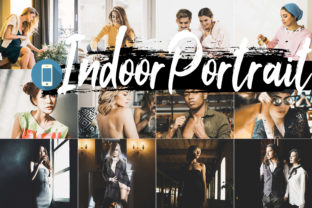
Before purchasing or committing to a preset pack, consider your typical indoor portrait conditions. Take a few sample images that represent your usual lighting—a well-lit living room, a dim bedroom, a fluorescent office—and test them with the presets if a sample download is available. Many preset providers offer product images showing before-and-after examples, but your own pictures will give you the most honest assessment.
Also evaluate how much time you actually spend on editing. If you currently spend 10 minutes per image and a preset reduces that to 2 minutes, the time savings may justify the cost and the need for occasional manual tweaks. But if you already edit quickly or prefer full manual control, the preset may end up being an unnecessary intermediate step.
Another factor is your willingness to learn. Presets can be educational tools: examine what adjustments a professionally built preset applies to your image. Look at the changes in exposure, contrast, temperature, and hue. Over time, you may internalize those techniques and rely less on presets as you develop your own editing style.
Finally, consider your output medium. If you share photos primarily on social media, where screen sizes are small and viewing conditions vary, slight color inconsistencies are less noticeable. For high-end print work or client galleries where color accuracy is critical, presets should be treated as starting points only, and final images should be carefully reviewed on a calibrated screen.
Determining Alignment With Your Goals
Indoor Portrait Mobile Lightroom Presets are a targeted tool, not a universal solution. They align well with the goals of photographers who value speed, consistency, and mobile editing for indoor portrait work. They are less aligned with photographers who need broad versatility, enjoy detailed manual editing, or work primarily in unpredictable or extreme lighting environments.
To decide whether this preset pack fits your needs, ask yourself three questions:
- Do you regularly edit indoor portraits on a mobile device using Lightroom CC?
- Would a repeatable base look save you significant time, even if minor adjustments are still needed?
- Are the five included preset styles close enough to your aesthetic preferences to serve as a useful starting point?
If the answer to all three is yes, this package is likely a practical addition to your mobile editing toolkit. If you are unsure, starting with a single set of five presets is a low-risk way to test whether presets improve your workflow. You can always expand to other collections or custom adjustments later.
Ultimately, presets are a means of reducing repetitive work, not a substitute for understanding exposure, composition, and light. Used thoughtfully, Indoor Portrait Mobile Lightroom Presets can help you spend less time on routine corrections and more time on capturing the images that matter to you.