Beer Glass PSD Mockup Photo: A Honest Look at Its Practical Value for Designers and Marketers
Mockups have become an essential part of how designers present their work to clients, how marketers preview campaigns, and how small business owners visualize products before production. Among the many options available, the Beer Glass PSD Mockup Photo stands out as a simple, no-fuss solution for displaying text or artwork on a glass surface. But does it deliver where it counts? This article examines what this mockup offers, who might benefit from it, and where its limitations lie.
What Is the Beer Glass PSD Mockup Photo?
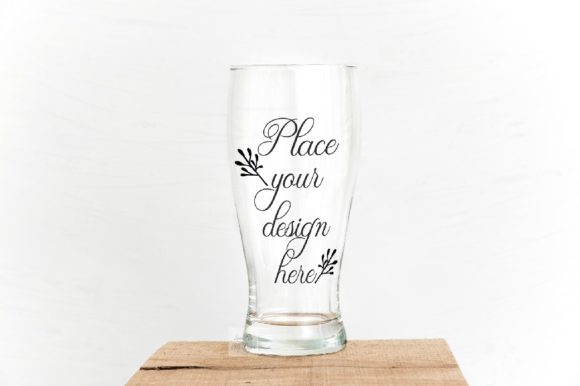
At its core, this is a real photographic scene of a rustic beer glass, captured in a minimal, neutral setting. You receive a single high-resolution JPG image at 3600 x 2400 pixels, 300 dpi, in RGB color space, along with one PSD file that includes a smart object layer. The smart object is where you insert your own design or text, and it is set to multiply blending mode, which allows your artwork to interact naturally with the glass surface and any lighting in the scene.
The file is compatible with Photoshop CS4 and later versions, and also works with the free online editor PIXLR. A help file with easy instructions is included, along with a screenshot showing the smart object outline, so you know exactly where to place your content.
One important detail worth noting: the clear glass and the background are on the same layer. This means the mug itself cannot be moved or repositioned within the scene. It is a fixed composition, and your flexibility is limited to what you place inside the smart object.
Realistic Foundation with a Rustic Aesthetic
The base photograph is genuine, not a 3D render. That matters for certain projects because real photography often carries subtle imperfections, natural lighting shifts, and tactile depth that synthetic scenes struggle to replicate. The rustic, minimal styling makes the mockup suitable for beer brands, craft breweries, bar and restaurant promotions, seasonal menus, and even casual lifestyle content. The neutral background ensures your design remains the focal point, without visual clutter competing for attention.
High Resolution and Print-Ready Quality
At 3600 x 2400 pixels and 300 dpi, the file is more than adequate for most digital and print applications. You could use the resulting image on a website, social media post, printed flyer, menu insert, or presentation board without worrying about pixelation or softness. The RGB color space is standard for screen-based work, but you can convert it for print if needed.
Simplicity and Ease of Use
This mockup is designed for efficiency. There is exactly one smart object layer, which means you open the PSD, double-click the smart object thumbnail, paste or place your artwork, save, and return to the main file. The multiply blending mode is already applied, so your design picks up the glass reflections, highlights, and shadows automatically. You do not need to adjust opacity, masks, or layer styles manually. For anyone who needs a quick, clean result without spending time on complex compositing, this setup is a genuine timesaver.
The inclusion of a help file and a screenshot further reduces the learning curve. Even if you are relatively new to Photoshop or have only used PIXLR, you should be able to produce a usable presentation within minutes.
Broad Platform Compatibility
Support for Photoshop CS4 and later versions covers a wide range of users, including those who may not have the latest Creative Cloud subscription. The option to edit via PIXLR, which is free and browser-based, extends access to anyone with an internet connection. This makes the mockup useful for freelancers working on older hardware, students learning design, or small business owners who prefer not to invest in expensive software.
Fixed Composition Cannot Be Adjusted
The most significant constraint is that the glass and background are merged into a single layer. You cannot move the mug, change its position within the frame, or swap it for another object. If your design requires a different angle, a closer crop, or a transparent background, this mockup will not accommodate that. What you see in the preview is the only composition you will get.
One Smart Object, Limited Creative Control
Because there is only one smart object, you cannot place separate design elements on different parts of the glass with independent blending or positioning. Your entire design must fit within the designated area, and it will be affected uniformly by the multiply blending mode. If your artwork requires precise masking, color overlays, or layered text effects, you may find the single-layer approach restrictive.
No Steam or Glass Reflections Are Separate
The clear glass and background share a layer, and there are no separate elements for steam, condensation, or glass reflections that you can toggle on or off. This is not necessarily a flaw, but it means the mockup offers a clean, straightforward look rather than a highly stylized, atmospheric scene. If you want a foggy, frosted, or dramatically lit glass, you will need to look elsewhere or add those effects manually.
Who Will Benefit Most from This Mockup?
Based on its strengths and limitations, the Beer Glass PSD Mockup Photo is best suited for specific use cases and audiences:
- Freelance designers and small agencies who need to present logo concepts, taglines, or label designs on a beer glass quickly for client approval. The realistic photo base adds credibility without requiring a photoshoot.
- Marketers and social media managers creating promotional graphics for breweries, pubs, or beverage brands. The rustic, minimal style fits well with craft beer branding and lifestyle content.
- Small business owners running a brewery, taproom, or restaurant who want to mock up a new beer name, seasonal special, or event graphic without hiring a designer or photographer.
- Bloggers and content creators in the food, drink, or hospitality niche who need realistic visual assets for articles, reviews, or social posts.
- Hobbyists and aspiring designers learning Photoshop or PIXLR who want a straightforward project to practice placing artwork into a smart object and understanding blend modes.
If your workflow demands high flexibility, multiple smart objects, or the ability to change the background or glass position, this mockup may not be the right fit. But if you need a dependable, no-surprises template that works out of the box, it is a solid choice.
Practical Recommendations for Getting the Best Results
To make the most of this mockup, keep a few practical points in mind:
- Design your artwork at the correct scale and resolution to avoid resizing within the smart object. Use the provided screenshot or help file to understand the smart object boundaries before you start.
- Because the blending mode is set to multiply, lighter colors and gradients tend to work well. Very dark or solid black designs may become opaque and lose the glass texture. Test your artwork on a copy of the PSD before finalizing.
- If you need to add text, consider using a clean sans-serif or slab-serif font that reads clearly against the glass background. Decorative or overly thin fonts may become hard to read depending on the lighting in the scene.
- Use the high-resolution JPG for quick previews or social media posts. Keep the PSD as your master file for future edits.
Long-Term Value and Reliability
Because this is a real photographic scene, it will not become dated quickly. The rustic, neutral aesthetic is timeless enough to be used for years without looking outdated. The PSD file, being a simple smart object setup, should remain compatible with future versions of Photoshop and PIXLR. You are not relying on complex scripts, 3D engines, or external plugins that might break with software updates. For a designer who values consistency and predictability, that kind of reliability matters.
The mockup also serves well as a baseline asset. If you own multiple mockups of different glass types or angles, you can build a small library of presentation templates that maintain a consistent photographic quality across projects. Over time, that consistency reinforces your brand and saves you from repeatedly setting up new scenes.
That said, this is a simple tool, not a comprehensive solution. Its long-term value depends on how often your work involves beer glass presentations. If that is a recurring need, the investment is justified. If you only need it once, the low complexity still makes it a convenient option.
Final Thoughts
The Beer Glass PSD Mockup Photo is not trying to be everything at once. It is a focused, minimal, and honest presentation tool that does one thing well: it lets you place your design on a realistic beer glass quickly, with minimal effort and no hidden complexity. The high resolution, print-ready quality, and compatibility with both Photoshop and PIXLR broaden its accessibility. The fixed composition and single smart object are clear limitations, but they also keep the file simple and reliable.
For designers, marketers, and small business owners who need a straightforward way to show how a logo, label, or message looks on a glass in a real environment, this mockup delivers exactly what it promises. It is a practical asset for anyone who values speed, realism, and ease of use over maximum creative control.