Inidia Oriental Colorful Mockup 11oz Mug: A Strategic Tool for Visual Branding and Content Creation
Visual presentation is no longer optional in today’s content landscape. Whether you are building a brand, launching a product line, or simply trying to maintain a cohesive social media presence, the way you display your designs matters. The Inidia Oriental Colorful Mockup 11oz Mug offers a ready-made, visually rich canvas for showcasing artwork, quotes, illustrations, and branding elements. This digital mockup, presented as a high-resolution flatlay with a vibrant background, is more than just a product placeholder—it can be a deliberate component of your visual strategy when used with clear goals and intentional planning.
Understanding the Mockup and Its Practical Value
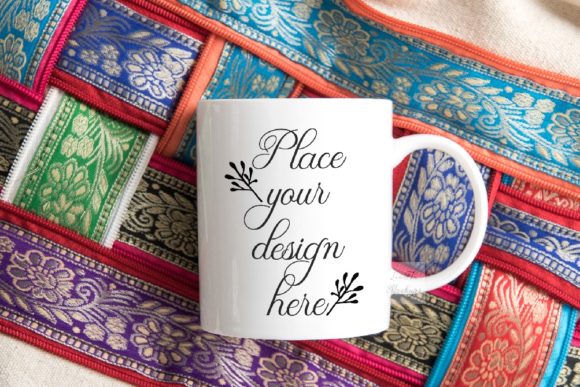
At its core, this mockup is a professional-grade digital file: a 3600x2400px 300 dpi JPG, paired with a PSD file featuring a smart object layer. The scene is a real photograph of a soft 11oz mug placed on a colorful background, with both elements fixed on a single layer. The smart object layer is set to multiply and is ready for you to insert your design or text. The simplicity of the structure—one smart object, no movable objects—means you can focus on your content rather than technical adjustments.
For entrepreneurs, small business owners, and content creators, this type of mockup solves a recurring challenge: how to present products or concepts in a visually appealing context without the overhead of physical photography. Instead of staging a real mug, buying props, and dealing with lighting and composition, you get a polished scene instantly. The colorful, oriental-inspired background adds aesthetic value, helping your design stand out in a crowded feed.
Strategic Use Cases: Beyond Simple Product Display
Using the Inidia Oriental Colorful Mockup 11oz Mug effectively requires linking it to broader goals. Here are several scenarios where it can support your planning and positioning.
Branding Consistency Across Channels
If you are a brand builder or marketer, visual consistency is critical. Using this mockup for multiple product concepts, seasonal campaigns, or limited-edition designs can help establish a recognizable visual identity. Because the background and mug are fixed, the only variable is your design. This constraint actually helps with consistency: every post or presentation will share the same mood and color harmony, reinforcing brand recognition. For example, a tea company launching a new line of mug designs could use this mockup to create a series of social media images, all sharing the same background, while the mug artwork varies. This creates a cohesive look that feels curated rather than chaotic.
Content Planning for Social Media and Blogs
Content calendars often demand a steady stream of fresh visuals. Using this mockup, you can plan a series of posts weeks in advance. Because the file is easy to update—simply replace the smart object layer in Photoshop or PIXLR—you can batch-create multiple versions in one session. A blogger writing about morning rituals, for instance, could pair each article with a different mug design that matches the post’s theme. An Instagram quote account could rotate inspirational text on the mug, maintaining visual interest without needing to capture new photos each day. The key is to align the mockup’s aesthetic with your content’s emotional tone. The colorful background works well for uplifting, creative, or lifestyle-oriented content, but may feel less appropriate for highly technical or corporate messaging.
Product Presentation for E-commerce and Shops
If you sell printable mug designs or custom artwork, this mockup can serve as a product shot for your online store. Instead of using a plain white background, the colorful flatlay adds context and appeal. However, think carefully about your target audience. An oriental-inspired background may attract certain niches—home decor enthusiasts, gift buyers, people interested in global aesthetics—but might not resonate with minimalists. Use the mockup intentionally for product categories where the background complements the design. For example, a vintage botanical illustration would harmonize beautifully; a corporate logo might clash. The mockup is a tool to communicate “this mug would look great in a lifestyle setting,” which can increase conversion rates when used strategically.
Planning Your Mockup Usage: A Decision-Making Framework
Before diving into the file, consider the following planning steps to maximize the mockup’s impact.
- Define your visual goal. Are you trying to sell a product, inspire an audience, or build a portfolio? The mockup’s style should align with that goal.
- Assess the audience context. Will your viewers respond to a colorful, busy background? If your audience values simplicity, you may need to adjust the design’s brightness or contrast to work with the existing scene. The smart object uses multiply blending, so darker designs often integrate better.
- Plan for variations. Since the background is fixed, focus on varying the mug design. Create a series of at least six designs to test which ones resonate. Use the same mockup for a sequence of posts and track engagement.
- Consider the platform format. The 3600x2400px resolution is ideal for print, web, and most social media sizes, but you may need to crop for Instagram Stories or square posts. Plan ahead which zones of the image are most important—the mug itself should remain central.
Practical Implementation Tips
Working with the PSD file is straightforward, but attention to detail makes the difference between a professional and an amateur result.
- Open the PSD in Photoshop CS4 or higher, or use the free online editor PIXLR. The smart object layer is clearly marked. Double-click its thumbnail to place your design.
- Because the layer is set to multiply, light colors or white areas may become transparent or blend heavily. Design with darker tones or use a white background inside your design to maintain opacity. Test a few versions to see how colors interact with the mug’s material and the background.
- The provided help file (a JPG with instructions) is essential—read it before opening the PSD. Layers in the PSD are hidden, so the help file clarifies where the smart object is and how to avoid common mistakes.
- You cannot move the mug or background since they are on the same layer. If you need a different composition, this may not be the right mockup. For the intended use—a simple, rapid placement—this limitation becomes a strength because it forces you to focus on the design rather than endless tweaking.
Risks of Using the Mockup Without Clear Goals
Like any tool, this mockup can be misused. The most common pitfall is using it for everything without considering context. If every single post or product image uses the same background, your content can become monotonous, and viewers may stop noticing it. Another risk is a mismatch between the mockup’s aesthetic and your brand’s identity. If your brand is sleek and modern, the colorful oriental background could dilute that message. Additionally, because the background is fixed and busy, poorly designed artwork can get lost. Designs with small text or fine details may not read well.
To mitigate these risks, be selective. Use this mockup for specific campaigns or categories, not for every application. Test the visual impact with a small audience before committing heavily. And always ask: does this mockup enhance the message, or does it distract?
Long-Term Value and Integration with Broader Content Operations
When used thoughtfully, the Inidia Oriental Colorful Mockup 11oz Mug can become a reliable asset in your content production workflow. Because it is a digital product, you can reuse it indefinitely. The high resolution and RGB color space make it suitable for both digital and print-on-demand platforms. Consider creating a template system: save your PSD with placeholders for different design sizes, and store your artwork separately. This allows you to generate new mockup images in minutes, supporting scalability.
For educators and professionals who create teaching materials, this mockup can illustrate concepts like color theory, branding, or product design in a visually engaging way. For freelancers, it is a quick way to show clients how a design might look on a physical product without commissioning photography. The key is to view the mockup not as a one-off graphic but as a repeatable component of your visual toolkit.
Making Thoughtful Decisions: Aligning the Mockup with Your Strategy
Ultimately, the value of this mockup depends on your awareness of your own goals. Before opening the file, ask yourself: Who is the audience? What impression do I want to create? How does this mockup’s specific color palette and style support my broader messaging? If the answers are clear, proceed. If not, step back and plan a content series that leverages the mockup’s strengths. For example, a “Colorful Inspiration” theme over two weeks could feature daily positive quotes on the mug, each with a slightly different design language but the same background, creating a visual series that followers anticipate.
The mockup is also a good fit for seasonal or event-based content. Around Lunar New Year or celebrations that resonate with oriental aesthetics, this background can feel timely and authentic. Using it for a short, targeted campaign can create a strong impression without overexposure.
Conclusion: Use with Intention, Not Randomness
The Inidia Oriental Colorful Mockup 11oz Mug is a quality digital resource that can elevate your visual content when used with strategy. It offers convenience, consistency, and a vibrant aesthetic that appeals to many creative and commercial contexts. However, its effectiveness hinges on intentional planning. Define your purpose, test your designs, and integrate the mockup into a broader content operation rather than relying on it as a catch-all solution. By doing so, you transform a simple stock photo into a strategic asset that supports your branding, communication, and long-term results.