Small Coffee Mug Mockup: A Versatile Digital Tool for Creators
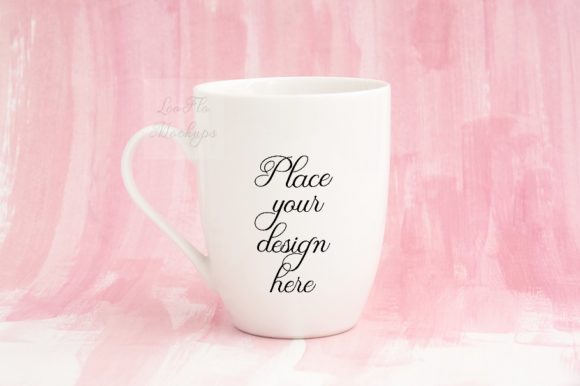
Whether you are an entrepreneur launching a new brand, a designer presenting a concept, or a blogger curating a cohesive aesthetic, the right product mockup can make all the difference. The Small Coffee Mug Mockup offers a thoughtful balance of elegance and simplicity. Set against a pastel pink painted background, this modern, soft feminine mockup provides a realistic canvas for showcasing your designs or text in a lifestyle context. It is a digital asset designed to help you communicate your vision without needing a physical photoshoot, saving time and effort while maintaining high visual standards.
Who Benefits Most from This Mockup
This digital mockup appeals to a wide range of professionals and creatives. Small business owners who sell handcrafted or printed mugs can use it to create product listings that feel both authentic and aspirational. Social media managers and content creators will find the pastel pink background perfect for Instagram feeds, especially those leaning toward soft, romantic, or minimalist branding. Graphic designers and illustrators can showcase their artwork in a real-use scenario, helping clients visualize the final product. Even educators and hobbyists can use the mockup to create presentation materials or portfolio pieces that look professional without requiring advanced photography skills.
Effortless Presentation for Social Media and Web Design
When you need to display a design on a mug for Instagram posts, blog headers, or product previews, the Small Coffee Mug Mockup provides a ready-made scene. The pastel pink background is not only on-trend but also versatile enough to complement a wide color palette. You can insert vintage illustrations, typography, logos, or patterns, and the result looks like a carefully staged lifestyle shot. This consistency helps build brand recognition and visual trust with your audience.
Time-Saving Workflow with Smart Object Technology
The included PSD file features one smart layer, allowing you to place your text or design onto the mug using Photoshop CS4 and up or via the free online editor PIXLR. This workflow is straightforward: open the file, double‑click the smart object, paste your artwork, save, and the mockup updates automatically. There is no need to spend hours masking, lighting, or adjusting perspectives. The real photo scene does the heavy lifting, so you can focus on creative decisions rather than technical setup. Additionally, you receive a high-resolution JPG (3504 x 2336 px at 300 dpi) in RGB, which is ideal for both screen display and print previews.
Clear Guidance for First-Time Users
If you are new to working with smart objects or PSD files, the package includes an easy instruction file (a JPG with step‑by‑step directions). This support reduces the learning curve and makes the mockup accessible to freelancers, small business owners, and hobbyists who may not be Photoshop experts. The instructions emphasize reading the help file before opening the PSD, because the layers are hidden and the mug and background are on the same layer. Understanding this upfront prevents confusion and ensures a smooth editing experience.
Real-World Use Cases: From Etsy to Instagram
Imagine you are an Etsy seller of custom coffee mugs with handwritten quotes. Instead of photographing each physical mug (which requires consistent lighting, props, and backgrounds), you can use this mockup to create multiple product shots by simply swapping the text or design. The pastel pink background gives your shop a cohesive, feminine look that appeals to many buyers. Similarly, a digital illustrator who sells pattern designs can show how those patterns appear on a curved mug surface, giving potential clients a realistic preview. For a blogger writing about morning routines or self‑care, placing a branded mug in a styled photo adds a professional touch that reinforces the post’s theme without needing a real photoshoot.
Limitations to Consider Before Purchasing
While the Small Coffee Mug Mockup is highly practical, it is not a fully editable 3D scene. Because the mug and background are on the same layer in a real photo, the mug cannot be moved or repositioned. The pastel pink background is fixed, so if your brand requires a different color or a more complex environment, you may need to look for a mockup with separate background layers. Additionally, the PSD file works best in Photoshop CS4 or later; although PIXLR is a free option, some advanced features may be limited. Keep in mind that this is a digital product — the physical mug and artwork are not included, and downloaded files will not carry watermarks. Consider your specific needs: if you require flexibility to change the background or move the mug within the frame, this particular mockup may feel restrictive. However, for those who value a ready‑to‑use, aesthetically pleasing scene with minimal editing complexity, it remains an excellent choice.
How This Mockup Supports Creative Goals
At its core, the Small Coffee Mug Mockup helps you solve the common problem of presenting a product idea in a realistic, appealing way without the overhead of production. It saves you the time and expense of a photoshoot, yet delivers high‑resolution results that look authentic. This efficiency is especially valuable for marketers, entrepreneurs, and publishers who need to produce multiple visuals quickly for campaigns, webinars, or social media schedules. By providing a consistent, soft aesthetic, it also strengthens brand identity — particularly for those targeting a feminine, modern, or welcoming audience. The pastel pink background evokes warmth and approachability, which can positively influence how viewers perceive your design or message.
Optimize Your Design for the Curved Surface
When placing your artwork into the smart object, keep in mind that the mug’s surface is curved. Avoid placing small text near the edges, as it may distort slightly. Centered, simple compositions tend to work best. If you are using vintage illustrations, ensure the linework or details are clear enough to remain legible after warping.
Leverage the High Resolution for Multiple Uses
The JPG image at 3504 x 2336 pixels offers plenty of detail. You can crop it for square Instagram posts, use it as a hero image on a landing page, or even print it on promotional materials like flyers or lookbooks. The 300 dpi resolution ensures the mockup holds up in both digital and print contexts.
Combine with Other Assets for a Complete Scene
Although the mug and background are locked together, you can add overlay graphics, text, or additional props into the PSD on separate layers above the mockup. For instance, adding soft shadows, a subtle texture, or a small floral element can enhance the composition without altering the original photo layer. Experiment with blend modes to integrate your additions seamlessly.
Final Thoughts on Choosing This Mockup
The Small Coffee Mug Mockup stands out as a focused, elegant solution for anyone who needs to display a design on a mug in a feminine, pastel-toned setting. Its simplicity is its strength: you get a polished result with minimal effort. Bloggers, Etsy sellers, social media influencers, and graphic designers will find it especially useful for maintaining visual consistency across platforms. While it does not offer full scene customization, its ease of use and high‑quality output make it a reliable tool for a specific but common presentation need. By keeping the editing process straightforward, it lets you concentrate on what matters most — your design or message. Whether you are preparing a product launch, updating your portfolio, or planning a cohesive Instagram grid, this mockup helps you present your work in a way that feels both professional and inviting.