Two White Mugs 2 Coffee Mug Mockup: A Practical Tool for Modern Branding and Creative Presentation
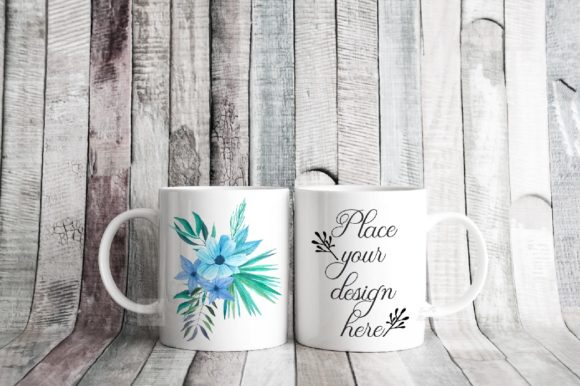
In the crowded world of product presentation, the difference between a sale and a scroll-past often comes down to one thing: how your design looks in a real-world context. The Two White Mugs 2 Coffee Mug Mockup offers exactly that—a realistic, minimal rustic scene where your artwork or branding can shine. For anyone creating custom drinkware, whether as a side hustle, a full-scale business, or a personal project, this mockup eliminates the guesswork of how a design will appear once printed on an 11oz double sublimation mug. The result is a polished, professional image that communicates quality and attention to detail without requiring a photography studio or styling experience.
At its core, this mockup provides a single high-resolution JPG at 3504 x 2336 pixels and a layered PSD file that works with Photoshop CS4 and above, as well as the free browser-based editor PIXLR. The smart object layers let you insert your design onto two identical white mugs placed in a naturally lit scene. Because the photo background and mugs are on a single locked layer, you cannot reposition the mugs—but that constraint is actually a strength. It ensures consistent composition every time, saving you from having to crop, align, or re-style your scene. The included help file guides you through the process, and the instructions emphasize reading the documentation before opening the PSD, since some layers are hidden by default. This approach avoids confusion for both beginners and experienced users.
Why Mockups Matter More Than Ever in a Visual-First Market
Consumer habits have shifted decisively toward visual decision-making. On platforms like Instagram, Pinterest, and Etsy, buyers form opinions in fractions of a second. A flat product photo or a plain digital render often fails to convey texture, scale, or the tactile feel of a printed mug. The Two White Mugs 2 Coffee Mug Mockup addresses this by offering a genuine photographed environment rather than a computer-generated scene. The rustic tabletop, soft natural lighting, and subtle shadows create an emotional resonance that a synthetic image cannot replicate. This matters because potential customers are not just buying a mug; they are buying into a mood, a lifestyle, or a memory associated with the design.
For creators and entrepreneurs who sell through print-on-demand services or handmade marketplaces, the ability to present multiple mockup views is increasingly expected by buyers. Showing a design on two identical mugs suggests the possibility of matching sets, gifting pairs, or coordinating with a partner or friend. It also allows you to display color variations or complementary motifs side by side without needing to photograph two separate scenes. This single-image approach streamlines your listing creation process while still offering variety to the viewer.
The double mug format also aligns with changing social habits. Coffee culture has evolved into a shared experience, whether at home, in the office, or during a casual meetup. A mockup that shows two mugs together taps into that social dimension, subtly encouraging buyers to imagine themselves sharing a moment with someone else. This psychological trigger is subtle but powerful, especially when marketing to adults aged twenty to fifty who value connection, comfort, and aesthetic harmony in their daily routines.
The Evolution of Product Mockups: From Static Placeholders to Authentic Storytelling Tools
Not long ago, product mockups were often generic, low-resolution templates that felt disconnected from the actual item. Designers would paste their artwork onto a glossy digital shape and call it a day. But as consumer expectations have risen, so has the quality of available mockups. The Two White Mugs 2 Coffee Mug Mockup represents a newer generation of tools that prioritize authenticity and ease of use. The real photo scene means the lighting, reflection, and surface texture are captured from an actual physical setup, not approximated in 3D software. This results in a more believable representation that reduces the risk of customer disappointment when the physical product arrives.
Another significant evolution is the accessibility of these tools. In the past, high-end mockups required expensive software and advanced Photoshop skills. Now, with smart object layers and compatibility with free editors like PIXLR, nearly anyone can produce professional-looking product images. The PSD file in this package uses two simple smart layers—one for each mug—so you only need to replace the placeholder with your own design. The rest of the image remains intact, including the lighting and shadows that interact with the mug surfaces. This simplicity is intentional, reflecting a broader industry trend toward user-friendly assets that respect the creator's time.
The hidden layers note in the instructions is worth highlighting. When you open the PSD, some layers are collapsed or invisible by design. This is not a flaw but a deliberate organizational choice to prevent accidental edits to the locked background. The help file warns you to read the instructions first, which is a small but considerate touch that reduces frustration for new users. This kind of thoughtful documentation is increasingly valued in a market where tutorial fatigue is real, and clear, concise guidance saves hours of trial and error.
Practical Applications Across Creative and Business Contexts
The beauty of a mockup like this lies in its versatility. Here are several realistic ways different users can leverage the Two White Mugs 2 Coffee Mug Mockup in their workflows:
- Print-on-demand sellers can use it to create listing images for platforms like Redbubble, Society6, or Amazon Handmade. By placing two versions of the same design—or two complementary designs—they can show product range without creating multiple listings. For example, a nature-themed artist might display a floral pattern on one mug and a matching leaf motif on the other, suggesting a coordinated set.
- Small batch ceramicists and crafters who sublimate their own mugs can use the mockup to preview new color palettes or seasonal collections before investing time and materials. Testing a design digitally on this realistic scene helps catch sizing, placement, or contrast issues early, reducing waste and rework.
- Social media content creators and lifestyle bloggers can include the mockup in posts about morning routines, home decor, or gift guides. The rustic aesthetic fits well with farmhouse, minimal, or Scandinavian style themes, which remain popular among twenty-to-fifty-year-old audiences. Sharing a branded image that looks like a candid lifestyle photo can increase engagement and build trust with followers.
- Corporate gift coordinators or promotional product specialists can use the mockup to present mock versions of company-branded mugs to clients. Showing two mugs together reinforces the idea of team unity or partnership, making it a subtle but effective sales tool for B2B proposals.
- Graphic designers and freelance artists can include the mockup in their portfolio to demonstrate how their patterns or illustrations translate to functional products. A strong product mockup often opens doors to licensing deals or custom commissions, as it proves the designer understands real-world application.
In each of these scenarios, the mockup serves as a bridge between concept and reality. It reduces the perceived risk for buyers and helps sellers communicate the scale, finish, and aesthetic of the final product. The 300 DPI resolution ensures that even when cropped or zoomed, the image remains sharp for both digital and light print use.
Navigating the Technical Side Without Overcomplicating
For those who may not use Photoshop daily, the idea of smart layers and PSD files might sound intimidating. However, the Two White Mugs 2 Coffee Mug Mockup is designed with straightforward workflows in mind. The smart object layers are clearly labeled—mug 1 and mug 2—and you only need to do the following: open the layer, paste or place your design, save, and close. The PSD file then updates automatically to reflect your artwork. If you do not own Photoshop, PIXLR (a free online editor) can open and edit PSD files with smart object support, making this mockup accessible to anyone with a browser and an internet connection.
One detail that deserves attention is the instruction to read the help file before opening the PSD. Because the background and mugs are on a single locked layer, attempting to rearrange the scene is not possible. This is not a limitation but a guardrail that prevents accidental disruption of the photo composition. The help file clarifies this upfront, saving users from needless frustration. It also explains where to find the hidden layers and how to prepare your design at the correct size to avoid stretching or pixelation. Following these simple steps ensures a clean, professional result every time.
Why Authenticity and Restraint Matter in Product Imagery
In an era of over-processed visuals, there is a growing appreciation for restraint. The minimal rustic style of this mockup does not compete with the design on the mug; it frames it. The neutral tones, soft focus, and natural light allow the artwork to take center stage. This approach aligns with what many successful product photographers have learned: the best supporting background is one that does not demand attention for itself. For marketers and creators, this means the mockup can serve a wide range of themes without clashing with bright colors or complex patterns.
Additionally, the fact that the scene is a real photograph—not a render—adds an intangible sense of honesty. Consumers have become adept at spotting artificial mockups, and in some niches, a heavily synthetic look can undermine credibility. By using a photo-based mockup, you signal that you care about realistic representation. This builds trust, especially when selling to adults who have likely experienced the disappointment of a product that looked nothing like its online image. The Two White Mugs 2 Coffee Mug Mockup helps you avoid that disconnect by offering a faithful preview of how the final item will appear in a genuine setting.
Practical Recommendations for Getting the Most Out of Your Mockup
To maximize the impact of this tool, consider the following grounded suggestions:
- Prepare your design at the correct aspect ratio. The 11oz mug surface is curved and has a limited printable area. Test your design within the smart object guidelines to ensure text or focal elements are not placed near the edges where distortion may occur.
- Use complementary colors on each mug. If you are displaying two variations, choose designs that share a common palette or theme. This strengthens the visual coherence of the image and makes the pair more appealing as a set.
- Respect the background integrity. Since the mug and background are on the same locked layer, avoid trying to cut out or replace the background. The beauty of this mockup is that the environment is already composed to enhance your product.
- Save your edits as a copy. Keep the original PSD unaltered so you can reuse it for future designs. Simply duplicate the file and rename it for each new project.
- Share cropped versions for social media. The high resolution allows you to crop a tight shot of one mug for Instagram stories or a square crop for Pinterest pins without losing clarity.
These recommendations come from observing how successful sellers and creators use mockups consistently. Small habits like naming conventions and color coordination make a noticeable difference over time, especially when you are managing multiple product lines or seasonal releases.
The Broader Context: Why This Mockup Fits Current Market Preferences
The demand for drinkware, particularly personalized mugs, has remained steady across multiple demographics. Coffee, tea, and hot chocolate are daily rituals for millions of adults, and a mug is both functional and sentimental. Sublimation printing has grown in popularity because it allows full-color, permanent designs that do not peel or fade. The Two White Mugs 2 Coffee Mug Mockup is specifically designed for this technology, showcasing the smooth, glossy finish characteristic of sublimation on ceramic. For buyers who are unfamiliar with sublimation, a realistic mockup helps them understand the quality they can expect, which can be a deciding factor in their purchase decision.
Furthermore, the current cultural moment favors intentional consumption. Many people aged twenty to fifty are moving away from mass-produced, generic items and toward products that feel curated, personal, or handmade. Showing your mug design in a thoughtful, rustic setting signals that your product is part of that intentional lifestyle. It is not just a cup; it is a piece of daily ritual and self-expression. This emotional resonance is what separates a forgettable listing from one that prompts a purchase.
Finally, the double mug format indirectly supports the gifting economy. Whether for holidays, weddings, housewarmings, or simply as a thank-you gesture, matching mugs are a popular choice. By presenting two mugs together, you make it easy for customers to visualize giving the set to someone else or buying one for themselves and one for a friend. This simple visual cue can increase average order value without any additional marketing copy.
In a practical sense, the Two White Mugs 2 Coffee Mug Mockup is a small investment that pays returns every time you use it. It eliminates the need to stage and photograph physical mugs repeatedly, saving hours of setup time and ensuring a consistent brand look across all your channels. For the entrepreneur, the marketer, the artist, or the hobbyist, having a reliable, high-quality mockup in your toolkit is no longer a luxury—it is a baseline requirement for competing in a visual marketplace. This particular mockup meets that need with simplicity, realism, and thoughtful design that respects both the creator and the end customer.