Evaluating the Enamel Tin Campfire Mug Mockup Flatlay for Design Presentations
Presenting a design concept to a client or showcasing a product idea on social media often requires more than just the artwork itself. The context in which the design appears can significantly influence how it is perceived. The Enamel Tin Campfire Mug Mockup Flatlay offers a specific visual framework for this purpose, placing designs onto a rugged, vintage-style metal cup within a top-down flatlay composition. This article evaluates this mockup as a tool, exploring its practical strengths, limitations, and the scenarios where it either excels or falls short.
What Is the Enamel Tin Campfire Mug Mockup Flatlay?
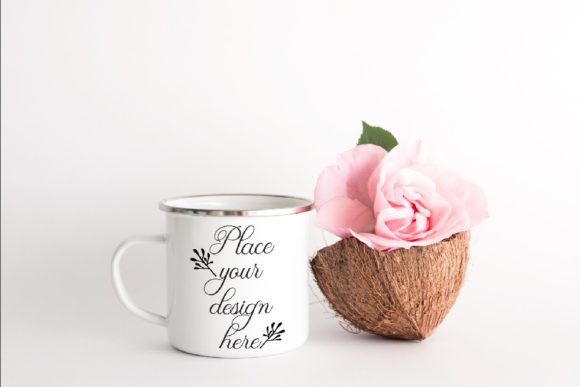
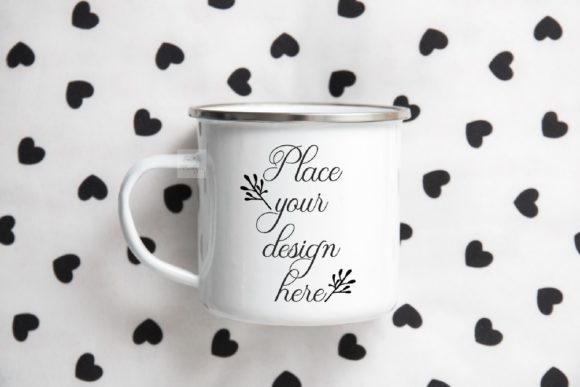
This mockup is a digital file package designed to help creators display text, logos, illustrations, or other graphics on a realistic photograph of an enameled tin camp mug. The image is presented as a flatlay—a top-down view of the mug placed against a neutral or natural-looking background. The package typically includes a high-resolution JPEG preview and a Photoshop PSD file with one smart object layer. The smart object is pre-formatted with a multiply blending mode, allowing the user to insert their design and have it blend naturally with the mug's texture and lighting. The background and the mug are on the same layer within the PSD, meaning the scene is fixed and the mug cannot be repositioned or isolated. The design is intended for use on platforms like Instagram, Etsy shops, blogs, and web design presentations, and the downloaded files come without watermarks or pre-existing designs.
Reasons to Consider This Mockup for Your Work
For designers, small business owners, and content creators, the choice of mockup can affect how much time is spent on presentation versus design. The Enamel Tin Campfire Mug Mockup Flatlay appeals to several practical needs.
Simplicity and Speed of Use
The inclusion of a single smart object layer means that inserting a design requires minimal steps. Users familiar with Adobe Photoshop (CS4 and above) or even free editors like PIXLR can place their artwork into the designated layer, save, and have a finished presentation image in minutes. For those who are not experienced with complex mockup workflows, this straightforward process reduces the learning curve and speeds up production. The multiply blending mode also handles many design backgrounds automatically, so you do not need to spend time masking or adjusting layer styles.
Visual Context That Tells a Story
A flatlay reveals the mug from above, often including surrounding elements like a wooden tabletop, fabric, or natural textures. This composition evokes outdoor, camping, rustic, or vintage aesthetics. If your brand or design aligns with these themes—such as a coffee roastery, a hiking gear company, a rustic home decor shop, or a line of enamelware—this mockup provides a cohesive visual narrative without requiring additional styling or photography. The context can help viewers immediately understand the product category and its intended use.
High-Resolution Output for Multiple Platforms
The 3600x2400 pixel, 300 dpi JPEG output is suitable for both digital and print applications. Whether you need images for an Instagram post, an Etsy listing, a blog header, or a product catalog, the resolution offers flexibility. The RGB color profile is standard for screen-based media, and the file size is manageable for quick uploads.
One-Time Digital Purchase
As a digital product, the mockup is available for immediate download after purchase. There are no recurring fees or subscriptions required to use the file. This can be a cost-effective option for creators who need a specific style of presentation but do not want to invest in a full mockup subscription service.
Tradeoffs and Limitations to Consider
No mockup is without constraints, and understanding them here is essential for deciding whether this file meets your needs.
Fixed Composition and Non-Editable Background
The most significant limitation is that the mug and background are on the same layer. You cannot reposition the mug, change the background, remove the mug from the scene, or adjust the camera angle. If your design requires a different orientation, a cleaner background, or more control over the environment, this mockup will not accommodate those changes. The scene is what it is—a single photograph with a fixed composition. If you need to show the mug from the side, without the flatlay background, or with a different prop arrangement, you would need an alternative mockup.
Multiply Blending Mode May Not Suit All Designs
The smart object layer is set to multiply, which works well for dark designs, line art, and graphics with transparent backgrounds. However, lighter designs, bright colors, or images with white backgrounds may not blend as naturally. The multiply mode tends to darken lighter areas and may not reproduce pastel or high-key artwork faithfully. Users with designs that rely on bright tones or fine gradients might need to adjust the layer blending or add extra contrast, which adds time and may require more advanced Photoshop knowledge.
Single Smart Object Limits Multi-Element Placement
With only one smart object layer, you can apply a single design to the mug. If your concept involves multiple graphics on different parts of the cup or a combination of text and illustration that needs separate placement, you will not be able to do that within this file. You would need to composite multiple images manually or use a mockup that offers multiple editable layers.
Style Specificity May Not Suit Every Brand
The rustic, outdoor aesthetic of the enamel tin mug is distinctive. While this is a strength for relevant brands, it can be a drawback for those whose visual identity is modern, minimalist, corporate, or luxury-oriented. Placing a sleek, high-tech logo on a rugged campfire mug may create a visual mismatch that confuses the audience or dilutes the brand message. The mockup inherently imposes a style on your design, so you must evaluate whether that style aligns with your brand tone.
Scenarios Where This Mockup Is a Strong Fit
Understanding when to use this mockup helps you make efficient decisions and avoid mismatches.
- Outdoor and Adventure Brands: Companies selling camping gear, hiking equipment, outdoor apparel, or survival tools will find the mug's aesthetic naturally complementary. The flatlay composition with textures like wood or canvas reinforces the brand's connection to nature and ruggedness.
- Rustic or Vintage Product Lines: Enamelware itself is often associated with vintage kitchenware, farmhouse decor, and traditional craftsmanship. Brands with a nostalgic or handmade identity can use this mockup to reinforce authenticity.
- Coffee and Beverage Businesses: A campfire mug is strongly associated with coffee, tea, or hot chocolate consumed outdoors. Roasters, cafes, and beverage brands can present their logos or slogans on the mug to evoke warmth and outdoor enjoyment.
- Social Media Content with Consistent Flatlay Themes: If your Instagram feed or blog follows a flatlay composition style with a natural, earthy palette, this mockup fits seamlessly. It saves the effort of photographing a real mug and background each time you need new content.
- Quick Prototyping and Client Pitches: When you need to show a draft design on a product without spending hours on mockup construction, this file provides a rapid, professional-looking result. The help file and easy instructions reduce the risk of errors for less experienced team members.
When Alternatives May Be Worth Considering
There are situations where a different mockup or approach might better serve your goals.
- You Require Full Editing Flexibility: If you need to change the background, adjust lighting, move the mug, or isolate the cup for use in composite images, look for a mockup with separate layers for each element. Many PSD mockups offer isolated objects on transparent or separate background layers, giving you full control over the scene.
- Your Design Uses Light or Bright Colors Heavily: The multiply blending mode may not render these designs optimally. A mockup with normal blending or a separate layer for the mug's texture (such as a displacement map or overlay) would allow you to maintain the brightness and saturation of your artwork.
- You Need Multiple Views or Angles: For an e-commerce product page, showing the mug from different angles (side, front, top, handle view) is often expected. This mockup provides only one top-down flatlay view. A set of mockups with multiple camera angles would be more appropriate for a complete product presentation.
- Your Brand Aesthetic Is Modern or Minimalist: A sleek, contemporary brand may be better served by a clean, neutral mockup with a white or solid-color background and a simple mug design. The rustic texture and props of this flatlay might clash with a minimalist brand identity.
- You Need to Display Complex Graphics or Multiple Elements: If your design involves a wrap-around pattern, a label that extends down the side, or multiple graphic placements on the mug, a single smart object with multiply blending will not support that level of complexity. A mockup with multiple smart objects or one that allows you to map designs to curved surfaces would be more suitable.
Practical Decision-Making Insights
Choosing the right mockup involves weighing your specific project requirements against the tool's capabilities. Here are some practical steps to help you decide.
Define the primary use case. Ask yourself where the final image will appear. If it is for a single Instagram post or a blog article with a rustic theme, this mockup may be perfectly adequate. If it is for a comprehensive product catalog, you may need a more versatile solution.
Test your design early. Before relying on this mockup for a series of images, create a quick test with one of your designs. Place it in the smart object and evaluate how the multiply blending affects your colors, contrast, and overall look. If the result matches your expectations, the mockup is likely a good fit. If not, you have saved time by discovering the limitation early.
Consider the audience. Think about how your target audience will perceive the image. Will the campfire mug context add positive associations or create confusion? For a brand that sells high-end kitchenware for indoor use, the outdoor setting might be distracting. For a brand that sells camping stoves, the mug reinforces the intended environment.
Assess your technical comfort level. The mockup is designed for simplicity, but you still need basic familiarity with smart objects and layer blending. If you are completely new to Photoshop or PIXLR, the included help file should guide you. However, if you prefer a drag-and-drop online mockup generator that requires no software at all, a web-based tool might be a better alternative.
Plan for volume. If you need to produce multiple images with different designs on the same mug style, this mockup allows you to reuse the same file repeatedly by swapping the smart object content. This can be efficient for series of social media posts or product variations. However, for high-volume production, ensure that the multiply mode and fixed composition do not become repetitive or limiting.
Evaluate the overall cost vs. versatility. Digital mockups are generally affordable, but the value depends on how often you use them. If this specific aesthetic matches a long-term brand direction, the purchase cost is likely justified. If you only need it for one small project and the aesthetic is not aligned with your ongoing work, borrowing or using a free alternative may be more practical.
Understanding the Download and Setup Process
When you purchase and download the file, you will receive a ZIP folder containing the PSD, the high-resolution JPEG preview, and a help file with instructions. The help file explains the smart object workflow and notes that layers are hidden by default. It is important to read this file before opening the PSD, as it clarifies how to locate the smart object layer and apply your design. The instructions also mention that the cup and background are on the same layer, which reinforces the limitation that the scene cannot be rearranged. Following the steps carefully will help you avoid confusion and produce a clean final image.
Final Perspective on the Enamel Tin Campfire Mug Mockup Flatlay
This mockup serves a specific niche: quick, attractive product presentations for rustic, outdoor, or vintage-themed brands that need a top-down flatlay composition. Its simplicity is its main advantage, allowing even those with basic Photoshop skills to produce professional-looking images in minutes. However, its fixed background, multiply blending mode, and single smart object layer impose clear boundaries on what can be achieved. For brands whose identity aligns with the campfire mug aesthetic, it can be a practical and time-saving asset. For those needing more editing flexibility, multiple angles, or a different visual style, exploring alternative mockups is a better path. By matching the tool to the task, you can use your time and resources more effectively and ensure that your design presentation supports your work rather than constrains it.