How to Use a Pink Glitter Flat Lay Mug Mockup for Stunning Design Previews
If you have ever tried to present a custom mug design to a client or show off your latest sublimation creation on social media, you already know how important presentation is. A flat lay pink glitter mug mockup offers a beautiful, minimal, and highly effective way to showcase your artwork without needing to photograph a physical product every time. This article will walk you through everything you need to know about using a pink glitter flat lay mug mockup, from what it actually is, to how to open the PSD file, place your design, and use it for social media, shops, blogs, and more.
What Is a Mug Mockup and Why Use a Pink Glitter Flat Lay Version?
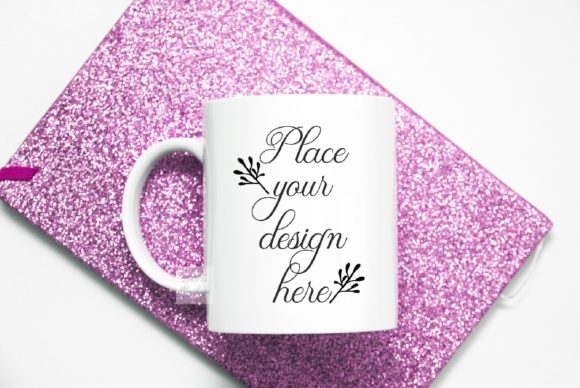
A mug mockup is a pre-made digital template—usually a high-resolution photo—that allows you to insert your own design onto a blank mug. The pink glitter flat lay version takes this concept and adds a soft, sparkly background that works beautifully for feminine, romantic, or vintage-themed projects. The top-down flat lay perspective means the mug is photographed from above, making it ideal for Instagram posts, product listings, and blog featured images.
The Purpose of a Flat Lay Mockup
Flat lay photography has become a staple in modern visual content because it gives viewers a clean, organized, and highly shareable view of a product. In the case of a pink glitter flat lay mug mockup, the background is kept minimal so that your design or text remains the focal point. The photo scene is real—meaning the cup and background are on the same layer—and the objects cannot be moved. This creates an authentic look that feels like a real product photo, not a synthetic render.
Practical Relevance for Designers and Small Business Owners
If you sell custom mugs on Etsy, Shopify, or Amazon, you know that every product listing needs a clear, attractive photo. Hiring a photographer for every new design is expensive and time-consuming. A mug mockup solves this by letting you produce a professional-looking product shot in minutes. The pink glitter style is particularly popular for wedding text displays, bridal shower gifts, birthday presents, and vintage illustration collections. The soft pink aesthetic appeals to a wide audience and fits well with modern branding trends.
Understanding the File You Receive: JPG and PSD with Smart Object
When you purchase this digital product, you receive two main files: one high-resolution JPG image and one PSD file with a smart object layer. Let us break down what each file does and how to use them effectively.
High-Resolution JPG Image (300 DPI, 3600x2400 px)
The JPG file is a ready-to-use image of the pink glitter flat lay scene with a blank mug. You can use it as a background, a placeholder, or a reference image. However, to add your own design to the mug, you will need to use the PSD file. The JPG is ideal for quick previews or for use in projects where you do not need to edit the mug itself.
The PSD File with One Smart Object Layer
The PSD file is where the real magic happens. It contains a single smart object layer that is set to multiply blend mode. This means when you place your text or design into that smart object, it will naturally blend with the mug surface, preserving the highlights, shadows, and texture of the original photo. You do not need to be a Photoshop expert—the smart object system makes it as simple as dragging and dropping your artwork.
Step-by-Step Guide to Placing Your Design on the Mug
Whether you are using Adobe Photoshop CS4 or later, or a free online editor like PIXLR, the process is straightforward. Follow these steps to get your design onto the mug quickly.
Using Adobe Photoshop
- Open the PSD file in Photoshop.
- Locate the Layers panel. You should see a single smart object layer named something like "Place Your Design Here."
- Double-click the thumbnail of that smart object layer. A new window will open.
- Drag your design or text into this new window. Resize and position it as needed.
- Save the smart object window (File > Save) and close it.
- Your design now appears on the mug, blended with the multiply effect.
Using PIXLR Online Editor (Free Alternative)
- Go to PIXLR.com and open the PSD file from your computer.
- In the Layers panel, find the smart object layer and double-click it.
- PIXLR will open the smart object content. Paste or upload your design into this layer.
- Save the smart object and return to the main view.
- Your design will appear on the mug, though the multiply blend effect may look slightly different than in Photoshop.
Creative Uses for Your Pink Glitter Flat Lay Mug Mockup
This mockup is not just for product listings. Its soft, minimal aesthetic makes it suitable for a wide range of creative projects. Here are some practical ways to put it to work.
Social Media Content for Instagram and Pinterest
Flat lay images perform exceptionally well on Instagram. Post a mockup of your mug with a seasonal design, add a few complementary props like flowers or a notebook, and watch the engagement grow. The pink glitter background adds a sense of warmth and celebration, which is perfect for announcements, giveaways, or simply showcasing your latest work.
Wedding and Event Text Displays
Because of its soft pink tone, this mockup is an excellent choice for wedding-related designs. Insert the couple's names, wedding date, or a romantic quote onto the mug, and use the image for save-the-date previews, bridal shower invitations, or thank-you posts. The vintage illustration style works beautifully here.
Blog and Web Design Presentations
If you write a craft or design blog, using mockups helps your readers visualize the final product. You can embed the mockup image directly into a blog post to illustrate a tutorial or a product review. For web designers, the clean flat lay also works well as a hero image or a call-to-action section background.
Etsy and Shopify Product Listings
When you sell mugs online, you need multiple images per listing. Use the mockup as your primary photo, then add lifestyle shots and close-ups. The pink glitter background helps your product stand out in search results and gives your shop a cohesive, professional look.
Common Misunderstandings and Important Notes
There are a few things you should know before using this mockup to avoid frustration. First, the cup and background are on the same layer. This is a real photo scene, meaning you cannot move the mug or change the background separately. The mockup is designed for placing your artwork onto the mug, not for rearranging the scene.
What You Can and Cannot Do with This Digital File
You may use the mockup commercially for displaying your designs on social media, in online shops, on blogs, and in web presentations. However, you may not sell, share, or claim the mockup itself as your own design. The physical mug and artwork are not for sale—this is a digital product only. Downloaded files will not have any watermark, so you can use them immediately.
The Multiply Blend Mode Explained
The smart object layer is set to multiply blend mode. This means that white areas in your design will become transparent, while darker areas will show up on the mug. If your design has a white background, that background will disappear, leaving only the actual artwork. This is why the mockup works so well—it makes your design look printed onto the mug rather than pasted on top of it.
Tips for Getting the Best Results
To make your design look as realistic as possible, keep a few best practices in mind. Use high-resolution artwork that matches the mug's dimensions. Avoid placing important text too close to the edges, as the mug's curve may distort it slightly. Test your design in the smart object layer and zoom in to check the alignment before finalizing. If you are using text, choose a color that contrasts well with the pink background but still feels cohesive.
Working with the Multiply Effect
Because the smart object uses multiply, your design will appear darker than it does on a white background. You may need to lighten your artwork slightly in advance to compensate. Alternatively, try adding a white outline or glow to text elements to ensure they remain readable against the mug surface.
Where This Mockup Fits into Modern Business and Creativity
In today's visual economy, having a fast and reliable way to produce product images is not just a convenience—it is a competitive advantage. Small business owners, crafters, and digital artists all benefit from tools that reduce the time between creating a design and publishing it. The pink glitter flat lay mug mockup is one such tool. It fits into a broader ecosystem of digital assets that help creative entrepreneurs work smarter, not harder.
Whether you are designing for a wedding, building an Instagram presence, or stocking your Etsy shop, a mockup like this gives you a consistent, high-quality visual foundation. You do not need a photography studio, expensive lighting, or a physical inventory. All you need is your design and a few minutes in Photoshop or PIXLR.
Final Thoughts: The Value of a Simple, Well-Made Mockup
This particular mockup is described as simple, and that simplicity is its strength. With one smart object layer and a beautiful pink glitter flat lay background, it removes every unnecessary complication. You are not fighting with complex layer structures or wondering which blend mode to use. You open the file, place your design, and save. That ease of use makes it accessible to beginners while remaining useful for experienced designers who need to produce content quickly.
By understanding how to use this mockup properly, you can elevate your product presentations, save time and money, and present your work in a way that feels polished and professional. Whether you are showcasing a vintage illustration, a wedding text display, or a bold modern logo, the pink glitter flat lay provides a soft, eye-catching stage that lets your design shine.